
What is Votepipe?
Votepipe is a unified voting API designed for game server owners. Instead of managing five different voting site api's and systems, Votepipe combines them into a single service. This allows you to create seamless Hytale vote rewards for your community while accessing a high-level dashboard to monitor your server's growth and voting metrics.
Why Server Owners Choose Votepipe
Using Votepipe simplifies the technical hurdle of rewarding players. Key benefits include:
- Simplified Systems: Use their Vote Reward Configurator to create custom and reactive Vote Rewards without even knowing how to code.
- Advanced Analytics: Track which voting sites bring in the most players.
- Reliability: Votepipe handles the downtime of individual voting lists so your rewards don't break.
Step-by-Step: Integrating Votepipe with Hytale Servers Pro
Integrating votepipe with Hytale Servers Pro is a simple process. We'll start by setting up a custom webhook inside your server's dashboard on Hytale-Servers.pro.
Enabling custom webhooks for your server
- Go to your dashboard on Hytale-Servers.pro!
- Find the server you want to enable custom webhooks for. Press the "Edit" button.
- Go to the "Technical" tab on the left.
- Enable the "Custom Voting Webhook".

- Click "Copy" on the Secret Hash field. This will be used to tell votepipe that the votes come from Hytale-Servers.pro.
- Don't leave this page, as we'll need to add the
Custom Voting Webhook URLlater on!
Setting up votepipe
To properly setup votepipe and create Vote Rewards for your players, you need to do 2 things. First is setting up your account and connecting Votepipe with Hytale Servers Pro. The second part is actually creating your vote rewards. We'll start with setting up your account and connect Hytale Servers Pro.
Creating a Votepipe account and Connecting to Hytale Servers Pro
- Go to Votepipe and create an account. You can login/register using Discord. Once logged in, you'll get prompted to set up your account.
- First setup your organization's name and slug. In this case we'll go with
HyServerandhyserverresepctively. Go to the next step. Press continue. - If you want to setup discord notifications when someone votes, you can do that here. If not, you can press the "Skip for now" button.
- Once done with the previous step you'll be able to add your first provider. We'll go for
Hytale-Servers.pro. - Leave the
Provider KeyandDisplay Nameas is. Remember theSecret Hashfield we copied earlier? Past that in theAuth Key from Hytale-Servers.profield inside Votepipe. Then press the "Create Provider" button.
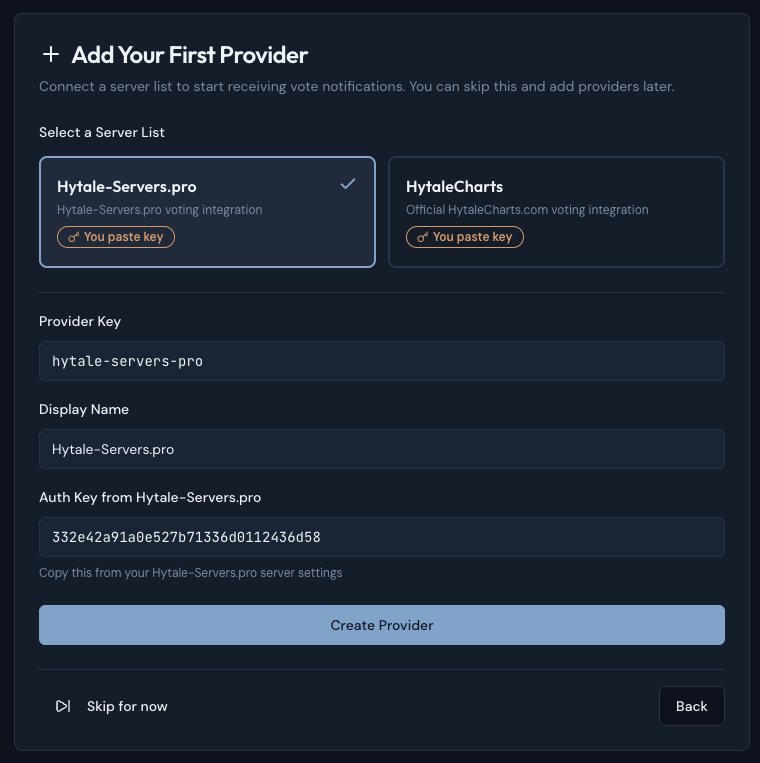
- Copy the Webhook URL that is now shown in Votepipe and go back to the Hytale-Servers.pro dashboard of your server.
- Paste the copied URL inside the
Custom Voting Webhook URLfield. Press "Save Changes" to save.
All votes made towards your server on Hytale-Servers.pro are now sent to Votepipe and properly registered!
Setting up Vote Rewards
Votepipe uses a very powerful custom engine that allows you to visually create conditional Vote Rewards. Going into all this functionally would be a bit out of scope for this guide. So today we'll focus on a simple item reward.
Make sure you have the Votepipe Plugin installed on your server to be able to receive Vote Rewards! You can find a guide on how to do that here!
- Inside the votepipe dasbhoard go to the Rewards tab on the left.
- Change the Plugin mode from
Developer ModetoAutomatic Mode. - Press the Create First Configuration button to add a new Reward Configuration.
- Select
Base Rewards. The other reward types require a premium account. - You should now see your Base Rewards under Reward Configurations, click it to open it up. It should be empty with zero actions.
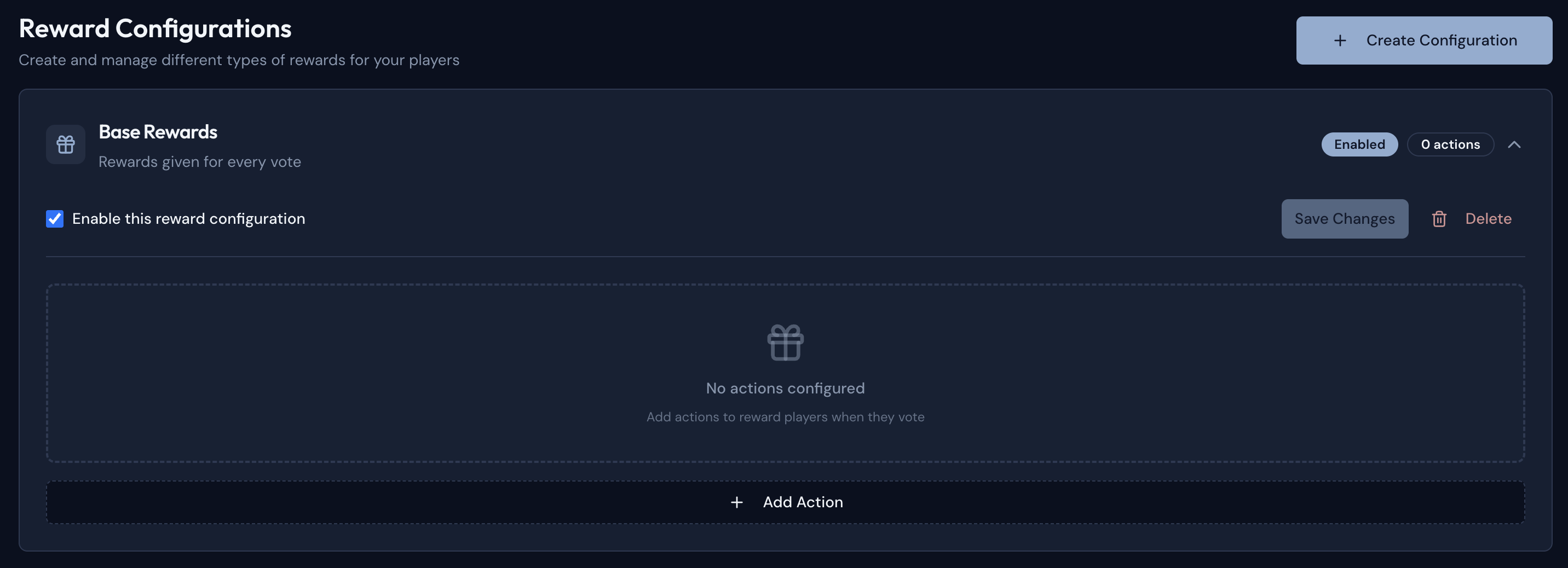
- Press the
Add Actionbutton to add an action. If it's not already selected, select theCommandaction. - Set the command to
give {player} Ingredient_Bar_Mithril 1. This will give the voting player 1 Mithril ingot. - Add another action by pressing
Add Actionagain. This time select thePlayer Messageaction. - Set the Message to
{player} just voted on {server} and reveid 1 Mithril Ingot!. This will let other players know that someone voted and what they got. Incentivizing them to also vote. - Press the
Save Changesbutton. Your final Configuration should look like this:
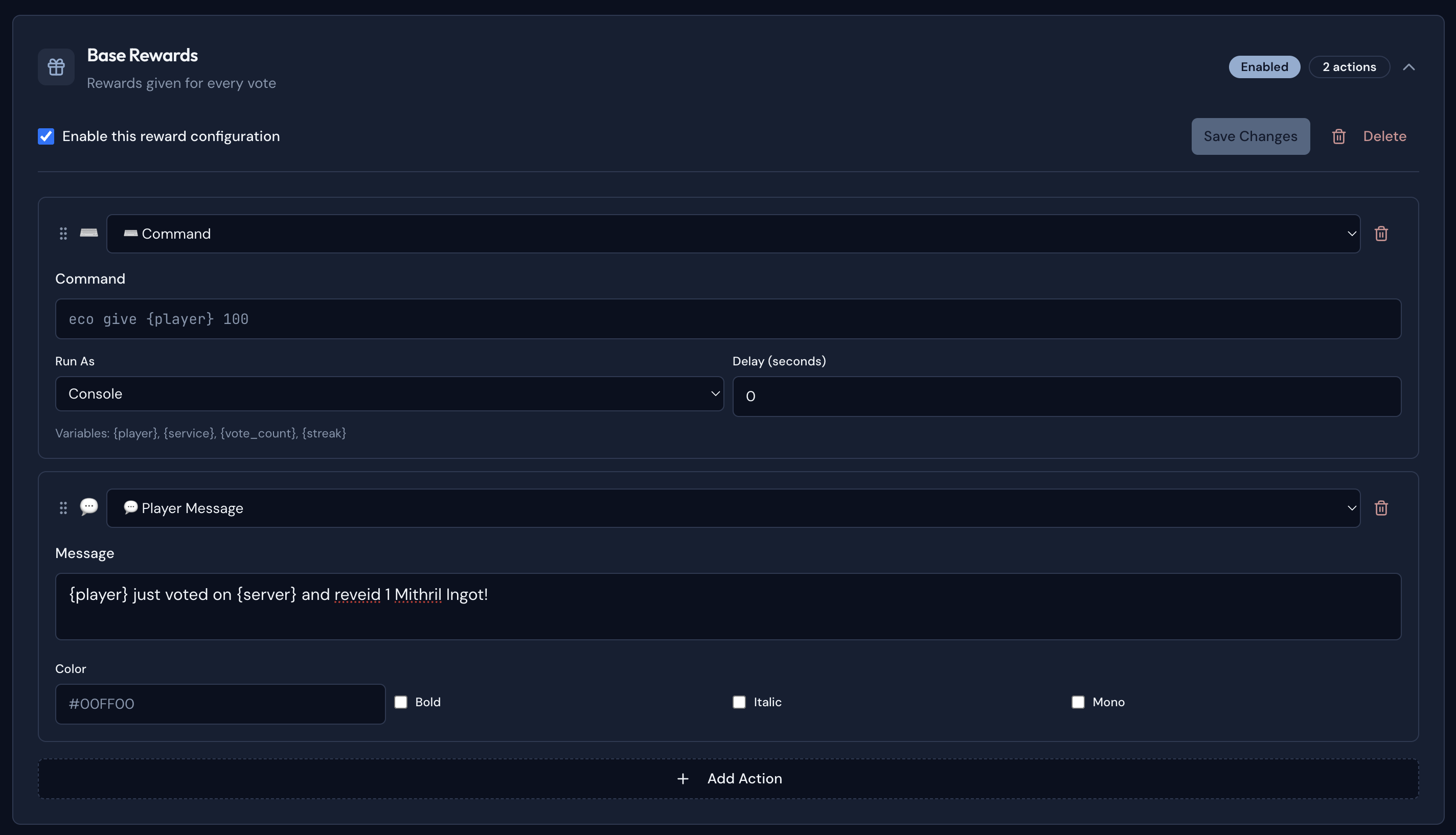
If everything went well your players should now receive rewards everytime they vote!